

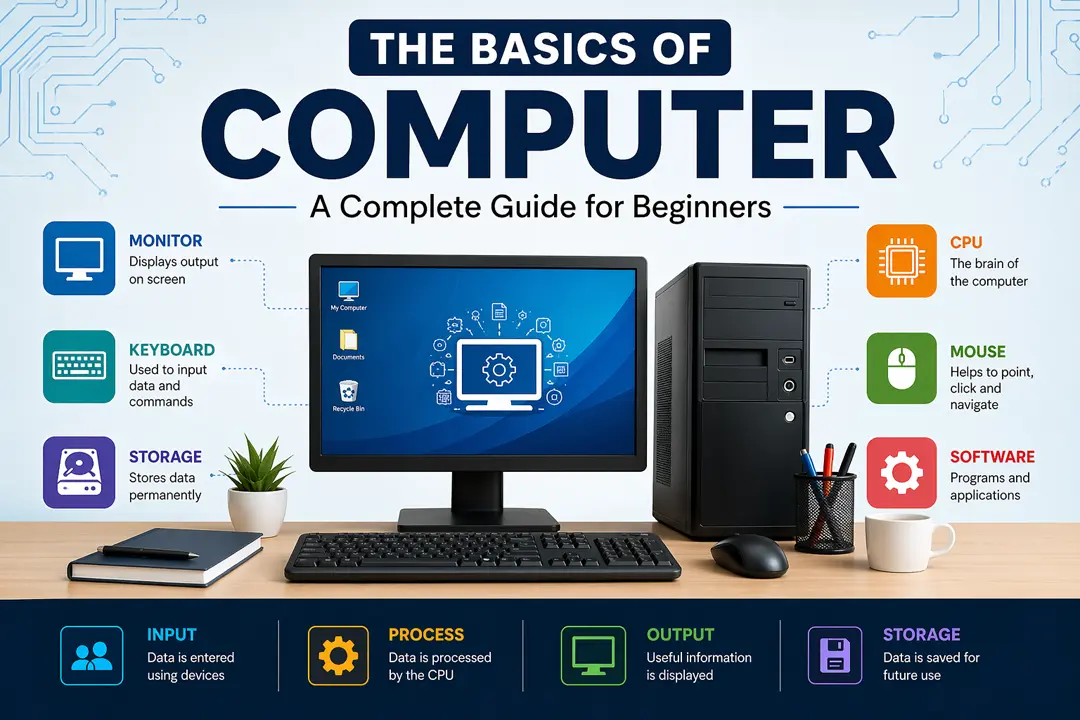
Computer: In this time computers have become an essential part of everyday life. From students attending online classes to Professionals managing businesses, Computers are everywhere. But if you’re just starting out, understanding how a computer works can feel overwhelming. This guide breaks down the Basics of computers in a Simple, Practical, and Easy to understand way, just like a real person explaining it to you step by step. Whether you are a student, job seeker, or someone curious about technology, this article will help you build a strong foundation.
What is a Computer?
A computer is an electronic machine that takes input (data), processes it, and produces output (information). It works based on instructions called programs. A computer is a smart electronic device that helps us perform tasks quickly and accurately by following a set of instructions. In simple words, it takes information from the user, processes it step by step, and then shows the result in a useful form.
A computer does not think on its own, it works exactly as it is told. It powerful is its ability to handle large amounts of data, perform complex calculations in seconds, and store information for future use. From typing documents and browsing the internet to managing businesses and running advanced technologies, a computer acts as a reliable tool that makes our daily work easier and more efficient.
How to work a Computer?
- You give instructions → Computer processes → You get results
For example:
- Typing a document
- Watching a video
- Calculating numbers
Basic Components of a Computer
A computer system is made up of several important parts. But it divided into two main categories: 1. Hardware 2. Software
1. Hardware (Physical Parts)
Hardware refers to all the physical parts of a computer that you can see and touch. These are the actual components that make up the computer system and allow it to function.
Key Hardware Components:
- Monitor – Displays output (like a TV screen)
- Keyboard – Used to type text and commands
- Mouse – Helps to navigate and click items
- CPU (Central Processing Unit) – The “Brain” of the computer
- Hard Drive / SSD – Stores data permanently
- RAM (Random Access Memory) – Temporary memory for running programs
2. Software (Programs & Applications)
Software is a collection of programs or instructions that tell the computer what to do. It is not physical, you cannot touch it but it controls how the hardware works.
Types of Software:
- System Software
- Example: Operating System (Windows, Linux)
- Controls the computer’s overall functions
- Application Software
- Example: MS Word, Excel, Browsers
- Used for specific tasks.
Difference Between Application Software and System Software
| Features | Application Software | System Software |
| Purpose | Its main purpose is to fulfill user needs and perform particular tasks. | Its main purpose is to run the computer system and manage its overall operations. |
| Dependency | It cannot run without system software. | It can run independently and provides a base for application software. |
| User Interection | Directly interacts with the user. | Mostly works in the background and interacts with hardware. |
| Examples | MS Word, MS Excel, Google Chrome, Photoshop etc. | Operating systems like Windows, Linux, mac OS, Device drivers. |
How Does a Computer Work?
A computer works through a simple cycle called the IPO Cycle:
Input → Process → Output
- Input: Data entered using keyboard, mouse, etc.
- Process: CPU processes the data.
- Output: Result shown on the monitor or printer.
Example: You type 5 + 5 → Computer processes → Shows 10
Types of Computers
Computers come in different forms based on size and usage:
1. Desktop Computer
- Fixed in one place
- Uses in Home, Offices, Schools etc.
2. Laptop
- Portable and Lightweight.
- Can be used anywhere.
3. Tablet
- Touchscreen device
- Easy to carry
4. Supercomputer
- Extremely powerful
- Used in Scientific research and Weather forecasting.
Input and Output Devices
Input Devices
An input device is a hardware component used to enter data and instructions into a computer. It allows the user to communicate with the computer and give commands for processing. Examples;
- Keyboard
- Mouse
- Scanner
- Microphone
Output Devices
An output device is a hardware component that receives processed data from the computer and presents it to the user in a readable or understandable form. Examples;
- Monitor
- Printer
- Speaker
Memory and Storage
Memory in a computer system is divided into two parts – 1. Primary Memory 2. Secondary Memory. Understanding memory is very important:
- Primary Memory (Temporary)
Memory is the part of a computer that temporarily stores data and instructions while the computer is working. It helps the processor access information quickly to perform tasks efficiently.
- RAM
- Fast but temporary
- Data is lost when power is off
2. Secondary Memory (Permanent)
Storage refers to the part of a computer that keeps data and information permanently for future use, even when the computer is turned off.
- Hard Disk / SSD
- Pen Drive
- Store data permanently
Operating System (OS)
An Operating System (OS) is a fundamental system software that acts as an interface between the user and the computer hardware. It manages all the resources of a computer such as Memory, Processor, Input/Output devices and Files, and ensures that different programs run smoothly without conflict.
The operating system is like a Manager that controls everything inside the computer and allows the user to interact with it easily.
It acts like a manager that:
- Controls hardware
- Runs applications
- Provides user interface
Popular Operating Systems:
- Windows
- macOS
- Linux
Basic Computer Skills Everyone Should Know
If you are a beginner, you need to focus on all these skills:
- Turning the computer on/off properly
- Using keyboard and mouse
- Creating and saving files
- Browsing the internet
- Using basic software (Word, Excel)
Advantages of Computers
- Fast and accurate work
- Stores large amounts of data
- Easy communication (email, video calls)
- Helps in education and learning
- Increases productivity
Knowing about basic computers has now become essential for everyone. Whether you want to Study, Work or Simply stay connected in the modern world, having basic computer knowledge gives you a strong advantage in your life.
There are many full forms related to computer hardware and software, the short forms of which we use constantly. The good news is that learning computers is not difficult. Start with the basics, practice regularly, and gradually explore advanced topics.
Basics of Computer – MCQ with Answers
Q1. What is a computer?
A) Mechanical device
B) Electronic device
C) Manual machine
D) None of these
Answer: B) Electronic device
Q2. Which of the following is the brain of the computer?
A) Monitor
B) Keyboard
C) CPU
D) Mouse
Answer: C) CPU
Q3. What does CPU stand for?
A) Central Process Unit
B) Central Processing Unit
C) Computer Personal Unit
D) Control Processing Unit
Answer: B) Central Processing Unit
Q4. Which of the following is hardware?
A) MS Word
B) Windows
C) Keyboard
D) Chrome
Answer: C) Keyboard
Q5. Which of the following is software?
A) Mouse
B) Printer
C) Monitor
D) MS Excel
Answer: D) MS Excel
Q6. Software is used to:
A) Touch the computer
B) Control hardware
C) Increase size
D) Clean system
Answer: B) Control hardware
Q7. Which of the following is an input device?
A) Monitor
B) Printer
C) Keyboard
D) Speaker
Answer: C) Keyboard
Q8. Which device is used to display output?
A) Scanner
B) Mouse
C) Monitor
D) Keyboard
Answer: C) Monitor
Q9. Microphone is an example of:
A) Output device
B) Input device
C) Storage device
D) Processing device
Answer: B) Input device
Q10. RAM is a type of:
A) Permanent memory
B) Temporary memory
C) External device
D) Software
Answer: B) Temporary memory
Q11. Which of the following stores data permanently?
A) RAM
B) Cache
C) Hard Disk
D) Register
Answer: C) Hard Disk
Q12. Full form of RAM is:
A) Random Access Memory
B) Read Access Memory
C) Run Access Memory
D) Real Access Memory
Answer: A) Random Access Memory
Q13. What is an Operating System?
A) Hardware
B) Application software
C) System software
D) Input device
Answer: C) System software
Q14. Which of the following is an Operating System?
A) MS Word
B) Windows
C) Excel
D) Chrome
Answer: B) Windows
Q15. OS acts as a bridge between:
A) User and hardware
B) Software and internet
C) Keyboard and mouse
D) Monitor and CPU
Answer: A) User and hardware
Q16. Which is the most powerful computer?
A) Laptop
B) Desktop
C) Supercomputer
D) Tablet
Answer: C) Supercomputer
Q17. A laptop is a:
A) Fixed computer
B) Portable computer
C) Supercomputer
D) Mini computer
Answer: B) Portable computer
Q18. IPO stands for:
A) Input Process Output
B) Input Program Output
C) Internal Process Output
D) Input Power Output
Answer: A) Input Process Output
Q19. Which step comes first in computer working?
A) Output
B) Process
C) Input
D) Storage
Answer: C) Input
Q20. Which device is used to print documents?
A) Monitor
B) Printer
C) Scanner
D) Mouse
Answer: B) Printer

